
Gmail Filtering 101
Last week, I enjoyed a week away from work / home / the US with our family for Spring Break > cute family photo on LinkedIn here. This LinkedIn post spawned a comment-conversation about how I don’t feel bogged down by email when I get back from a no-email-checking vacation.
Without a doubt, my Google Workspace filtering system is probably one of my most forgotten and under-valued workflows.
In the age of AI, let’s not forget the simple functions that already exist in the products we’re already paying for.
When I logged on Monday, post-vacation, I already had 1.25 hours blocked on my calendar for emails before I started anything else (because email stress is real and I want to crank through it first). In reality, it actually only took me 40 minutes to get through, because I skipped a bunch of newsletters and got distracted by a shiny object. Squirrel!
Here’s what my email filters look like this morning (8 unread in the inbox, but I’ll read those tomorrow when I’m back in my office):
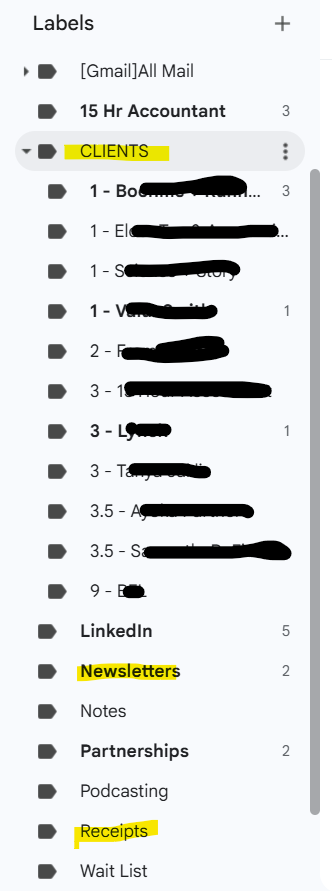
Here are my most important folders:
Client folders > Each client gets filtered to their own folder. Creating the filter is part of my client onboarding process. Folders are then prioritized by what tier they’re paying for.
Newsletters > I’m on a bunch of great newsletters (Ryan Lazanis, Earmark, Wave Seattle, my state CPA society, Geraldine Carter, Jillian Johnsrud, ChooseFI, Jason Staats, Tailor Hartman, Luke Templin…a lot). I like them all in one place for when I’m in a reading mood or see something that catches my eye. I also give myself permission to not read every single one and unsubscribe from the ones I’m truly not reading.
Receipts > Any recurring charge receipt gets filtered here and “marked as read” immediately. I don’t plan on looking at them until I get audited. Is this unwise? Maybe I trust my system too much. I do a monthly review of my financials during my own close process, so I’ll catch any weird charges there.
Inbox > Obviously anything not filtered lands here and I have to go through one-by-one. There’s not usually much here - 8 this morning, like I said.
Then, every working morning, post vacation or not, I go through email in this order:
Inbox - read, delete, unsubscribe to anything someone’s added me to
Client folders - read everything, respond if necessary, don’t need to solve any problems in the moment unless it takes me <3 min
Newsletters - do I have time to read anything? If not, no biggie.
Before you “AI” your email or hire an assistant, create some filters. It might solve 80% of your email problem. And if you still have to AI or hire, you’ll at least give them something cleaner to work with.
If you don’t know how to create a filter in Gmail…
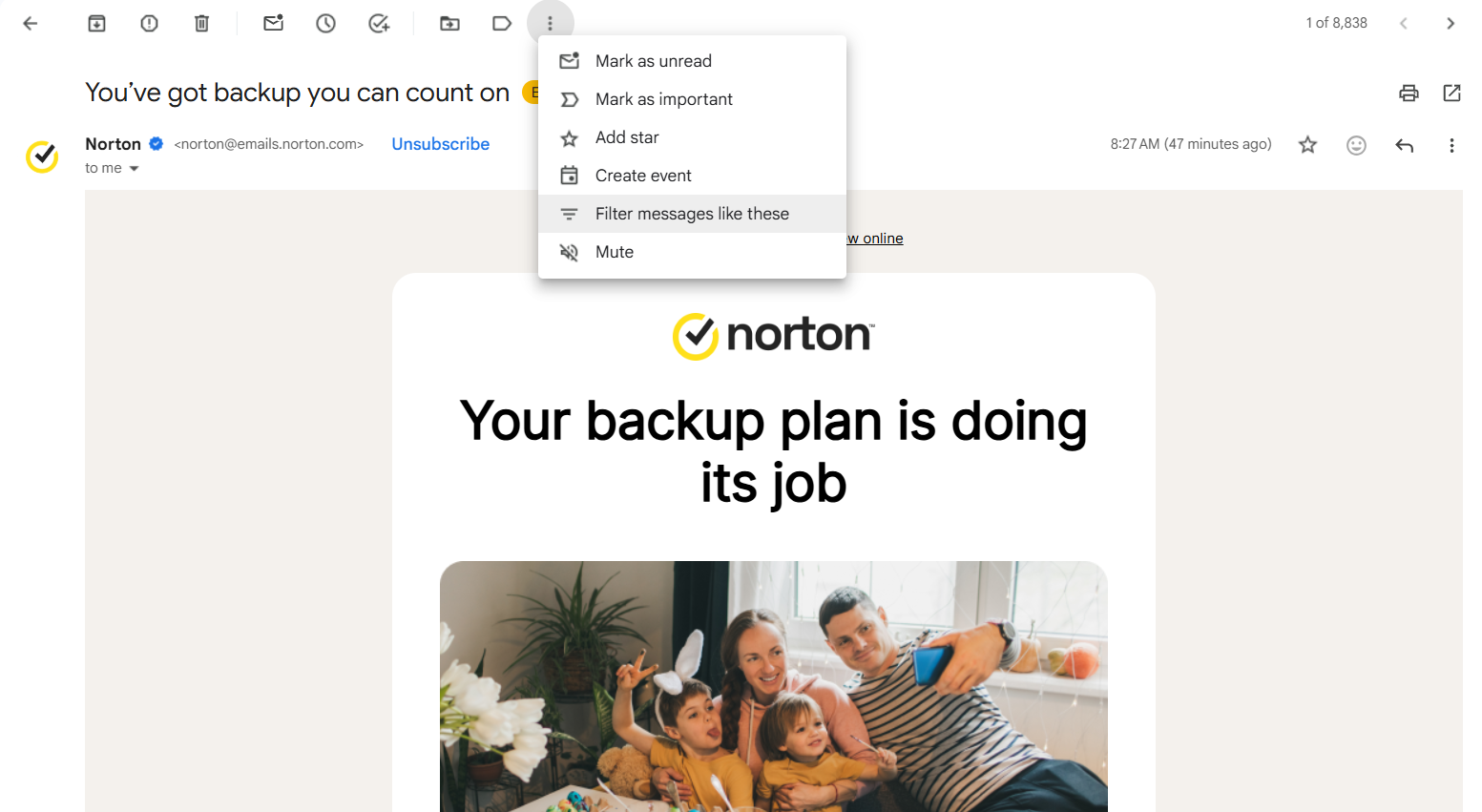
Then filter by email address (Gmail usually pre-populates that) or subject line (works great for receipts or payroll systems).
Hope this helps!
Erica

What’s Happening in Aligned
Recently Added to the Video Library:
Anchor: Demo & Discussion [2.11.26]
Transitioning to Anchor [2.25.26] (Erica walked through how she did it last year)
Office Hours with Erica [3.24.26]
Engagement Letter Template > JUST ADDED HERE
Swipe it, customize it for your Fractional CFO and Bookkeeping engagements
Financial Cents: Demo + Discussion
Thur, Apr 9th - 12pm MT > RSVP Here
Demos requested by members and are not sponsored
Speed Networking for Side Hustlers
Tue, Apr 28th - 6pm MT > RSVP Here
Building a firm while working your W2? Meet others in the same boat!
Question of the Week > What question do you have for this week’s office hours? (it’s never too late to ask a question! I can answer in the comments.)
Current Discussions On > hiring a coach, professional reading recs, CFP niching bookkeeping nuances, business valuation (someone in Aligned is certified to do this - yay!), building a waitlist, and more!
Join the discussion with 170+ like-minded, non-scaling accountants / really cool humans in the link below. $75/mo, no commitment - come and go as you please :o)
Money back guarantee, if you get in there and don’t see the value. No questions asked.
More details in the link above.